
Introduction
Choosing the right web hosting is one of the most important decisions when building a website. No matter how good your design or content is, poor hosting can slow down your website, reduce security, and negatively affect user experience.
In 2026, website performance has become more important than ever. Google prioritizes fast and reliable websites, and visitors expect pages to load instantly. If your hosting is weak, your website may lose traffic, rankings, and potential customers.
However, many beginners choose hosting based only on low price. This often leads to slow speed, downtime, poor support, and scalability problems later.
This guide will help you understand how to choose the right hosting for your website, what features to check, and which hosting providers are worth considering, including Hostinger.
What is Web Hosting?
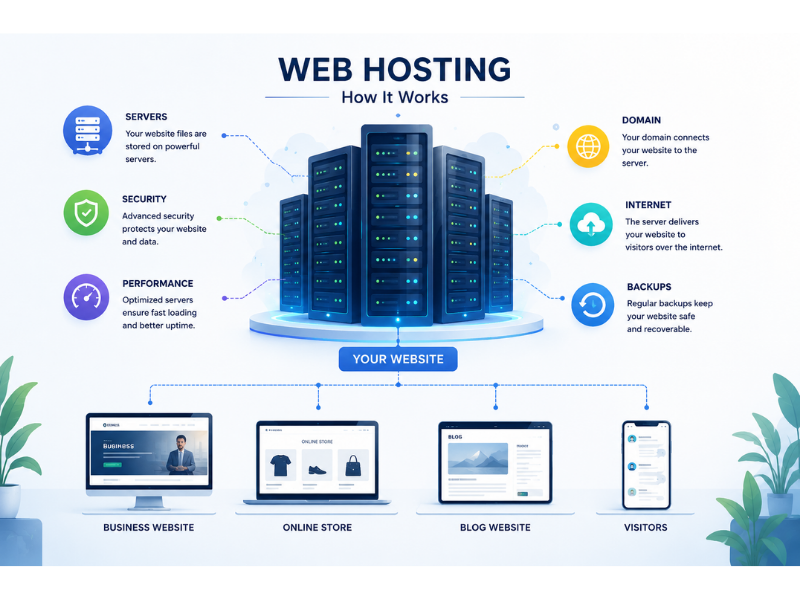
Web hosting is a service that stores your website files and makes them accessible on the internet.
When someone visits your website, the hosting server delivers your website content to the visitor’s browser.
Without hosting, your website cannot go online.
Main Functions of Hosting
• Store website files
• Deliver website content
• Manage website traffic
• Improve speed and uptime
• Provide security and backups
Choosing the right hosting provider ensures your website performs properly.
Why Hosting Matters More in 2026
Modern websites require better performance than before.
Search engines now focus heavily on:
• Website speed
• Mobile performance
• Security
• User experience
Poor hosting directly affects all these areas.
Problems Caused by Bad Hosting
• Slow loading speed
• Frequent downtime
• Security risks
• Poor SEO performance
• Lost customers
A fast and stable hosting provider improves both rankings and conversions.
Different Types of Web Hosting
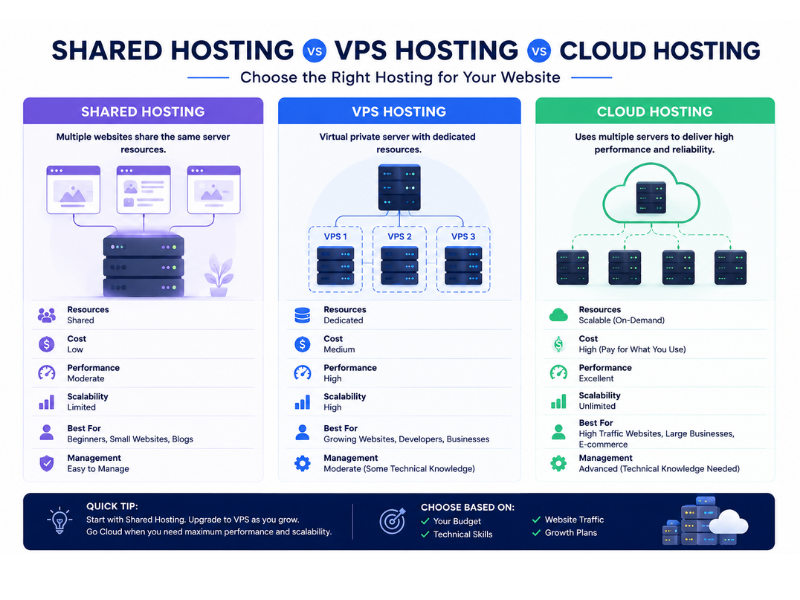
Before choosing a hosting provider, you need to understand the main hosting types.
Shared Hosting
Shared hosting is the most affordable option.
Multiple websites share the same server resources.
Best For
• Beginners
• Small websites
• Personal blogs
• Startup businesses
Advantages
• Low cost
• Easy setup
• Beginner-friendly
Disadvantages
• Limited performance
• Slower during high traffic
• Shared resources
Hostinger is one of the most popular shared hosting providers for beginners because it offers affordable plans and good performance.
VPS Hosting
VPS stands for Virtual Private Server.
It provides dedicated resources within a shared environment.
Best For
• Growing websites
• Medium traffic businesses
• Developers
Advantages
• Better speed
• More control
• Improved performance
Disadvantages
• Higher cost
• Requires technical knowledge
VPS hosting is ideal when your website outgrows shared hosting.
Cloud Hosting
Cloud hosting uses multiple servers together for stability and performance.
Best For
• Large businesses
• High-traffic websites
• Scalable projects
Advantages
• Excellent scalability
• High uptime
• Strong performance
Disadvantages
• Higher pricing
• Complex management
Cloud hosting is becoming increasingly popular in 2026.
Managed WordPress Hosting
Managed hosting is specifically optimized for WordPress websites.
Features
• Automatic updates
• Security optimization
• Speed optimization
• Dedicated support
Best For
• Business websites
• WooCommerce stores
• Non-technical users
Some hosting providers, including Hostinger, now offer managed WordPress plans with performance optimization.
Important Features to Check Before Buying Hosting
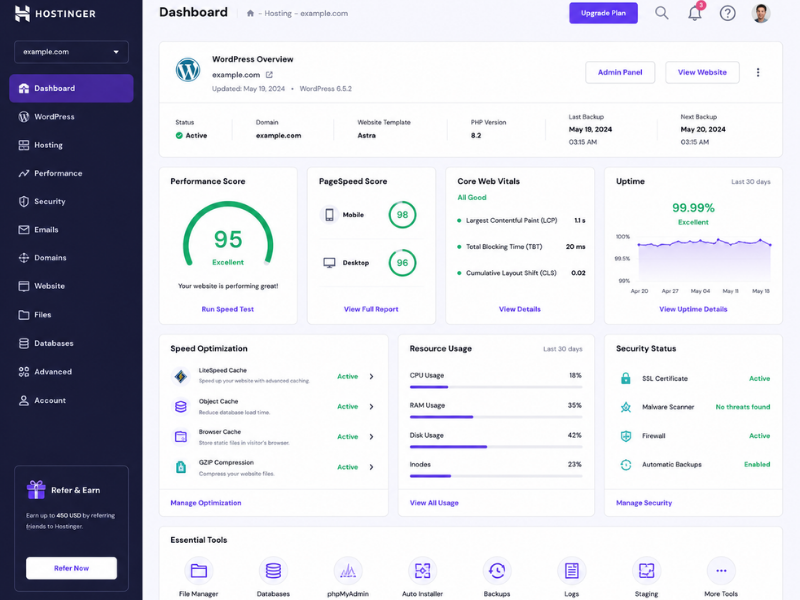
Many people buy hosting without checking important technical features
This creates problems later.
Website Speed and Performance
Speed is one of the most important hosting factors.
Check For
• SSD or NVMe storage
• LiteSpeed server
• CDN support
• Server response time
Hostinger is popular because it offers LiteSpeed technology and good loading performance at affordable pricing.
Uptime Guarantee
Uptime refers to how often your website stays online.
Recommended Uptime
• 99.9% or higher
Frequent downtime affects both SEO and customer trust.
Customer Support
Good support becomes critical when problems occur.
Look For
• 24/7 support
• Live chat
• Fast response time
Hostinger is known for responsive live chat support, especially for beginners.
Security Features
Security should never be ignored.
Important Security Features
• Free SSL certificate
• Malware scanning
• Firewall protection
• Daily backups
A secure hosting environment protects your website from attacks.
Scalability
Your hosting should support future growth.
Ask Yourself
• Can the hosting handle more traffic later?
• Can you upgrade easily?
Choosing scalable hosting saves future migration costs.
Ease of Use
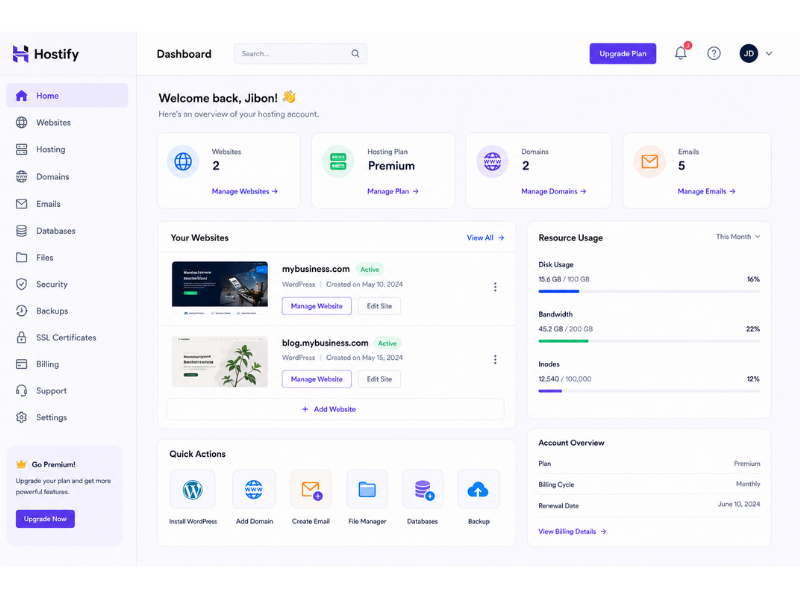
Beginners often struggle with technical hosting dashboards.
Look For
• Easy control panel
• One-click WordPress install
• Simple management tools
Hostinger’s hPanel is beginner-friendly and easier than many traditional hosting dashboards.
Hosting Pricing: What You Should Know
Many hosting providers advertise very low prices.
However, beginners often ignore renewal costs.
Check Carefully
• Renewal pricing
• Hidden fees
• Domain cost
• Backup cost
Hostinger offers affordable entry pricing, but users should also check long-term renewal rates.
Common Mistakes People Make When Buying Hosting
Choosing Based Only on Price
Cheap hosting is not always good hosting.
Ignoring Website Speed
Slow hosting damages SEO and user experience.
Buying Unnecessary Expensive Plans
Many beginners purchase advanced hosting they do not need.
Not Checking Support Quality
Poor support can create serious problems during website issues.
Is Hostinger a Good Choice in 2026?
Hostinger has become one of the most popular hosting providers for beginners and small businesses.
Why Many Users Choose Hostinger
• Affordable pricing
• Good website speed
• LiteSpeed technology
• Beginner-friendly dashboard
• WordPress optimization
Best For
• Small business websites
• Portfolio websites
• Blogs
• Beginner WordPress users
However, very large websites with heavy traffic may eventually require VPS or cloud hosting solutions.
Which Hosting Type Should You Choose?
Choose Shared Hosting If
• You are a beginner
• Your traffic is low
• You want low cost
Choose VPS Hosting If
• Your website is growing
• You need better performance
• You want more control
Choose Cloud Hosting If
• You expect high traffic
• You need scalability
• You run large projects
Verdict
Choosing the right hosting is essential for website speed, SEO, security, and long-term growth.
Beginners should focus on reliable and beginner-friendly hosting instead of choosing the cheapest option available.
For most small business websites and WordPress users, providers like Hostinger offer a strong balance between performance, simplicity, and affordability.
However, the best hosting ultimately depends on your website size, traffic, technical skills, and future goals.
Need Help Choosing Hosting?
If you are confused about selecting the right hosting for your website:
• Website consultation
• Hosting setup assistance
• WordPress optimization
• Website migration support
Contact us today for professional guidance.
You can also explore more Digital & Tech Articles to improve your website performance and online business growth.
