
Introduction
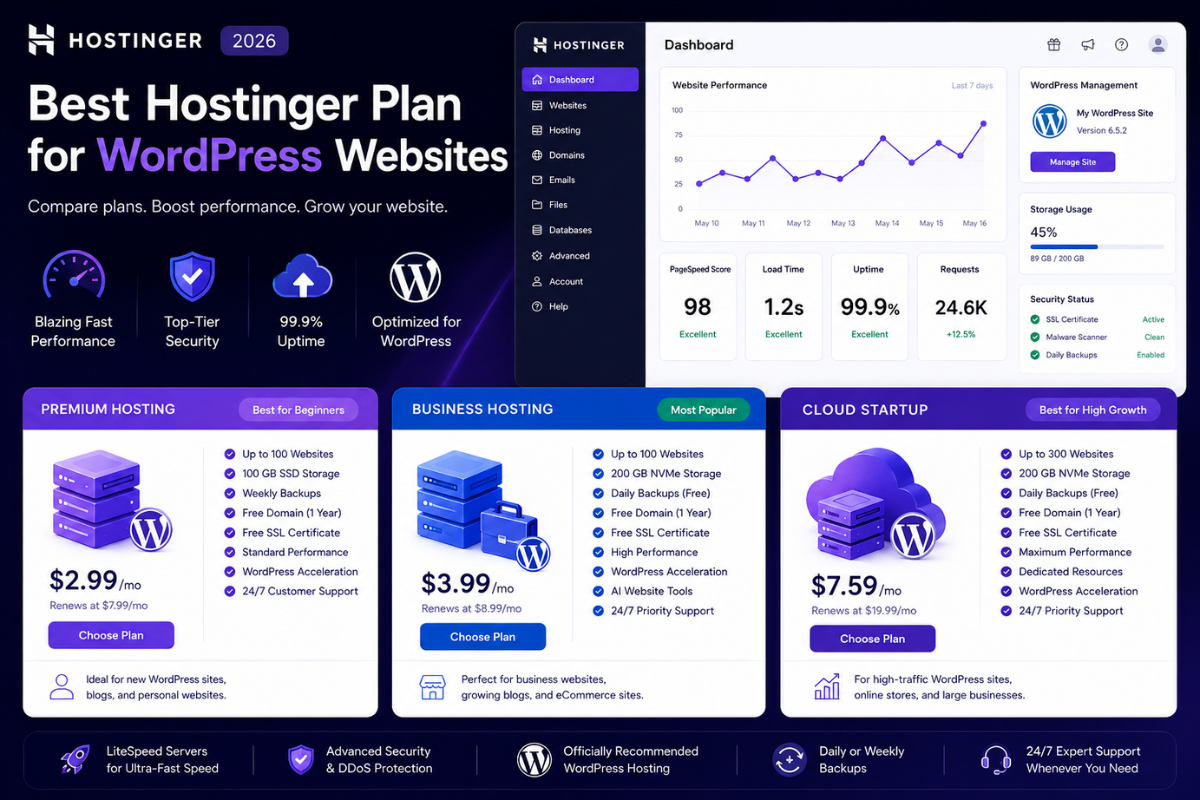
Best Hostinger Plan for WordPress Websites is one of the most important questions WordPress users ask when choosing a hosting provider in 2026.
WordPress powers millions of websites worldwide, including business websites, blogs, online stores, portfolio sites, and membership platforms. However, WordPress performance heavily depends on the hosting plan you choose.
A poor hosting plan can result in slow loading times, poor SEO rankings, security issues, and website downtime. On the other hand, the right hosting plan can improve speed, user experience, search engine visibility, and overall website performance.
Hostinger has become one of the most popular WordPress hosting providers because of its affordable pricing, WordPress optimization features, strong security, and reliable infrastructure.
But which Hostinger plan is best for WordPress websites?
In this guide, we compare Hostinger Premium Hosting, Business Hosting, and Cloud Hosting to help you choose the best Hostinger plan for WordPress websites in 2026.
Best Hostinger Plan for WordPress Websites: Quick Comparison
| Plan | Best For | Storage | Backups | Performance |
|---|---|---|---|---|
| Premium Hosting | Beginners | 100 GB SSD | Weekly | Good |
| Business Hosting | Growing WordPress Sites | 200 GB NVMe | Daily | Excellent |
| Cloud Startup | High-Traffic Websites | 200 GB NVMe | Daily | Outstanding |
Why WordPress Hosting Matters
A WordPress website requires more than basic hosting.
The right hosting environment affects:
• Website speed
• Search engine rankings
• Security
• User experience
• Plugin performance
• WooCommerce functionality
• Website uptime
Many WordPress problems are caused by inadequate hosting resources rather than WordPress itself.
Choosing the best Hostinger plan for WordPress websites helps avoid these issues from the beginning.
What Makes a Great WordPress Hosting Plan?
Fast Storage
Modern WordPress websites benefit from NVMe storage and optimized caching.
Daily Backups
Backups protect your website from accidental errors and cyber threats.
WordPress Optimization
Server-level optimization improves WordPress performance.
Security Features
Essential security features include:
• SSL certificates
• Malware protection
• DDoS protection
• Automatic updates
Scalability
Hosting should support future growth.
1. Hostinger Premium Hosting
Best Budget Option for WordPress Beginners
Hostinger Premium Hosting is designed for users launching their first WordPress websites.
Features
• Host up to 100 websites
• 100 GB SSD storage
• Free SSL
• Free domain
• Managed WordPress support
• Weekly backups
• WordPress acceleration tools
Pros
✔ Affordable
✔ Easy setup
✔ Beginner friendly
✔ Free domain included
Cons
✘ Weekly backups only
✘ Lower resources than Business Hosting
Best For
• Personal blogs
• New websites
• Freelancers
• Small portfolios
Performance Review
Premium Hosting provides excellent value for new WordPress users but may become limiting as traffic grows.
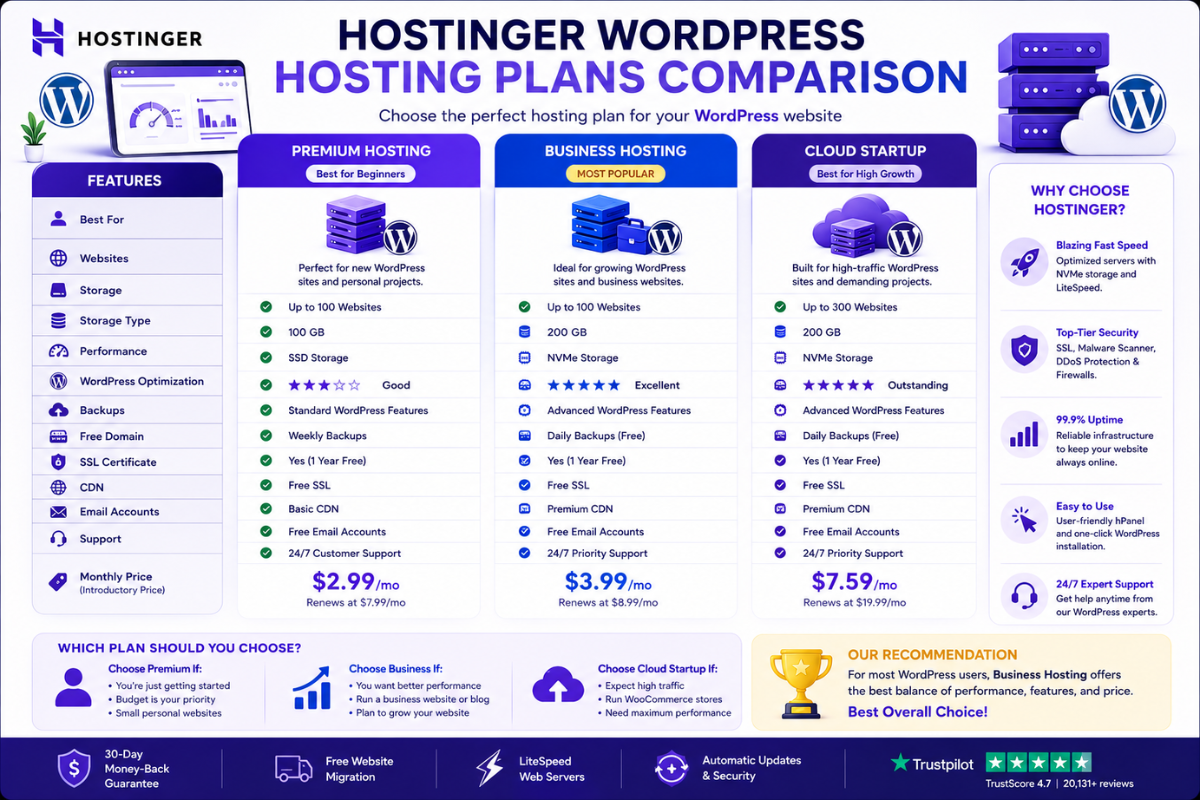
Hostinger WordPress Hosting Plans Compared
| Feature | Premium | Business | Cloud Startup |
|---|---|---|---|
| Storage | 100 GB SSD | 200 GB NVMe | 200 GB NVMe |
| Backups | Weekly | Daily | Daily |
| Performance | Good | Excellent | Outstanding |
| Security | Good | Better | Advanced |
| Scalability | Moderate | High | Very High |
| WordPress Optimization | Good | Excellent | Excellent |
Winner
Business Hosting
Reason:
Best combination of performance, storage, backups, and affordability.
2. Hostinger Business Hosting
Best Hostinger Plan for WordPress Websites
Business Hosting is the best choice for most WordPress users.
Features
• 200 GB NVMe storage
• Daily backups
• Enhanced WordPress optimization
• AI website tools
• Free SSL
• Free domain
• Better resource allocation
Pros
✔ Faster loading times
✔ Daily backups
✔ Excellent SEO performance
✔ Better reliability
✔ Outstanding value
Cons
✘ Slightly more expensive than Premium
Best For
• Business websites
• Company websites
• Professional blogs
• Affiliate websites
• Content-driven websites
Why Business Hosting Wins
Business Hosting delivers a noticeable performance improvement over Premium Hosting while remaining affordable for most website owners.
WordPress SEO and Hosting Performance
Hosting plays a major role in SEO.
Google considers user experience signals such as:
• Page speed
• Mobile performance
• Website stability
• Loading times
A faster WordPress website can improve:
• Search rankings
• Conversion rates
• User engagement
• Visitor retention
Business Hosting provides the best balance between SEO performance and affordability.
3. Hostinger Cloud Startup
Best for Large WordPress Websites
Cloud Startup provides dedicated resources and cloud infrastructure.
Features
• Dedicated resources
• Advanced performance
• Daily backups
• Cloud infrastructure
• Premium reliability
Pros
✔ Outstanding speed
✔ Better uptime
✔ High scalability
✔ Handles traffic spikes
Cons
✘ Higher monthly cost
Best For
• High-traffic blogs
• WooCommerce stores
• Membership websites
• Agency websites
• Enterprise projects
When to Upgrade
Consider Cloud Startup if:
• Traffic exceeds tens of thousands of visitors monthly
• You run an online store
• Your website handles large amounts of content
WordPress Website Performance Requirements
A successful WordPress website requires:
Fast Loading Speed
Improves user experience and SEO.
Strong Security
Protects customer and website data.
Reliable Uptime
Keeps your website available 24/7.
Daily Backups
Provides peace of mind.
Growth Potential
Supports future business expansion.
Business Hosting meets these requirements exceptionally well.
Best Hostinger Plan by Website Type
| Website Type | Recommended Plan |
|---|---|
| Personal Blog | Premium Hosting |
| Business Website | Business Hosting |
| Affiliate Website | Business Hosting |
| Company Website | Business Hosting |
| WooCommerce Store | Cloud Startup |
| Membership Site | Cloud Startup |
Best Hostinger Plan for WordPress Bloggers
Winner:
Business Hosting
Reason:
Better speed and daily backups support long-term content growth.
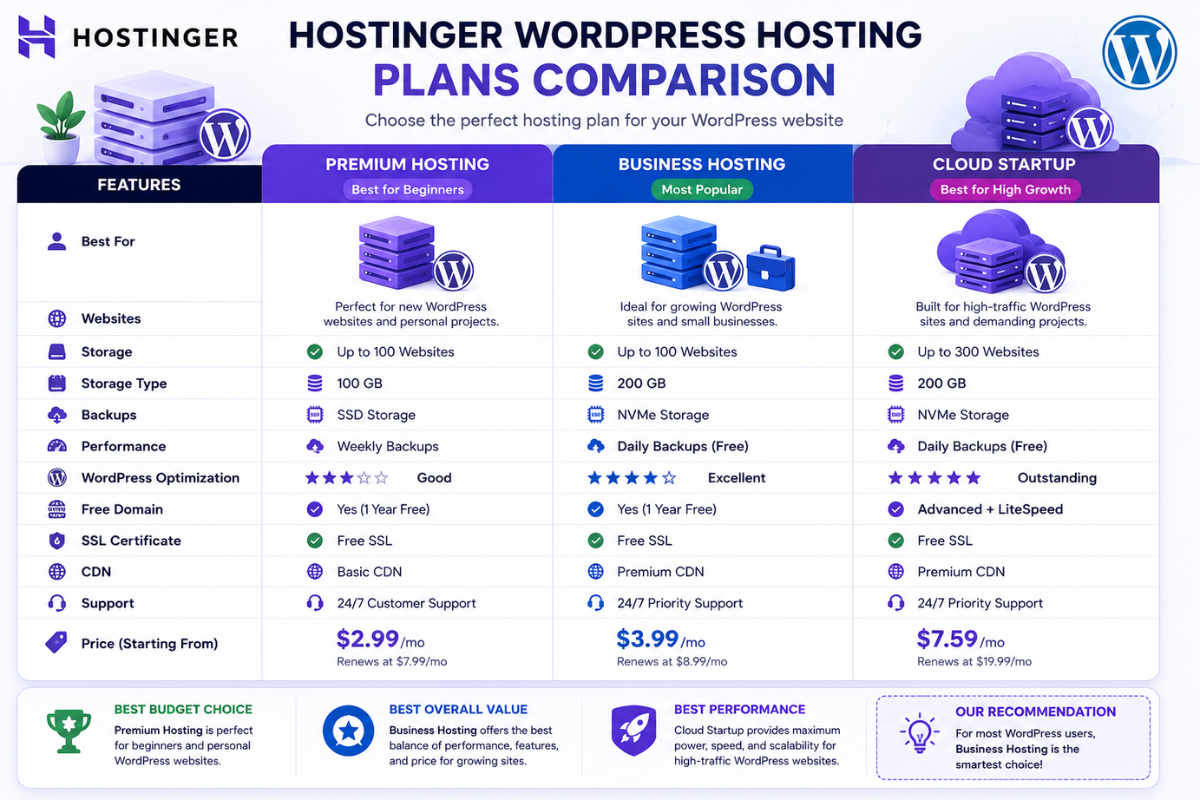
Premium vs Business vs Cloud Hosting
Premium Hosting
Best for beginners.
Business Hosting
Best overall value.
Cloud Startup
Best performance.
Most WordPress website owners will benefit most from Business Hosting.
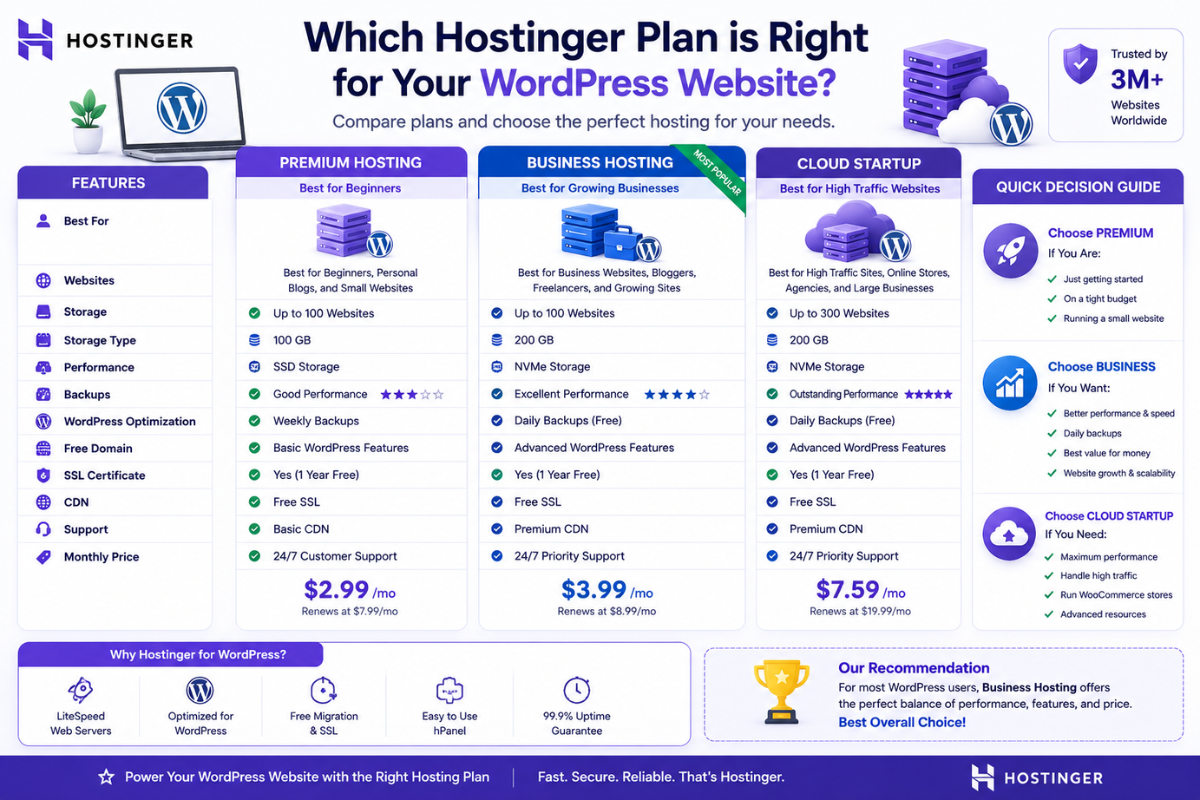
Which Hostinger Plan Should You Choose?
Choose Premium Hosting If:
• You are starting your first WordPress website
• Budget is limited
• Traffic is low
Choose Business Hosting If:
• You run a business website
• SEO matters
• Website speed matters
• You want daily backups
Choose Cloud Startup If:
• You run WooCommerce
• Traffic is high
• Performance is critical
Best Hostinger Plan for WordPress Websites: Final Comparison
| Category | Winner |
|---|---|
| Best Budget Plan | Premium Hosting |
| Best Overall Value | Business Hosting |
| Best Performance | Cloud Startup |
| Best for SEO | Business Hosting |
| Best for WordPress | Business Hosting |
Final Verdict
After comparing all available options, Business Hosting is the best Hostinger plan for WordPress websites in 2026.
It offers faster NVMe storage, daily backups, better WordPress optimization, stronger performance, and excellent value for money.
While Premium Hosting is ideal for beginners and Cloud Startup is excellent for high-traffic websites, Business Hosting provides the best balance of performance, affordability, and long-term scalability.
Best Recommendation
Winner: Hostinger Business Hosting
Reason:
Hostinger Business Hosting delivers the ideal combination of speed, security, WordPress optimization, daily backups, and affordability for most WordPress website owners.
Find the best hosting option for growing businesses: Best Hostinger Plan for Small Businesses in 2026.
Compare all Hostinger hosting packages: Best Hostinger Hosting Plans Compared in 2026.

3 thoughts on “Best Hostinger Plan for WordPress Websites in 2026: Which Plan Is Right for You?”