Introduction
Small businesses often struggle with customer management, lead tracking, follow-ups, and sales organization. As customer inquiries come from websites, social media, emails, phone calls, and messaging apps, keeping everything organized manually becomes difficult.
Many businesses still rely on spreadsheets, notebooks, or disconnected tools, which often leads to missed follow-ups, lost sales opportunities, and poor customer experiences.
This is where CRM software becomes essential.
CRM software helps small businesses manage leads, automate tasks, improve customer communication, and streamline sales workflows from a single platform.
But with so many options available, choosing the right CRM can be confusing.
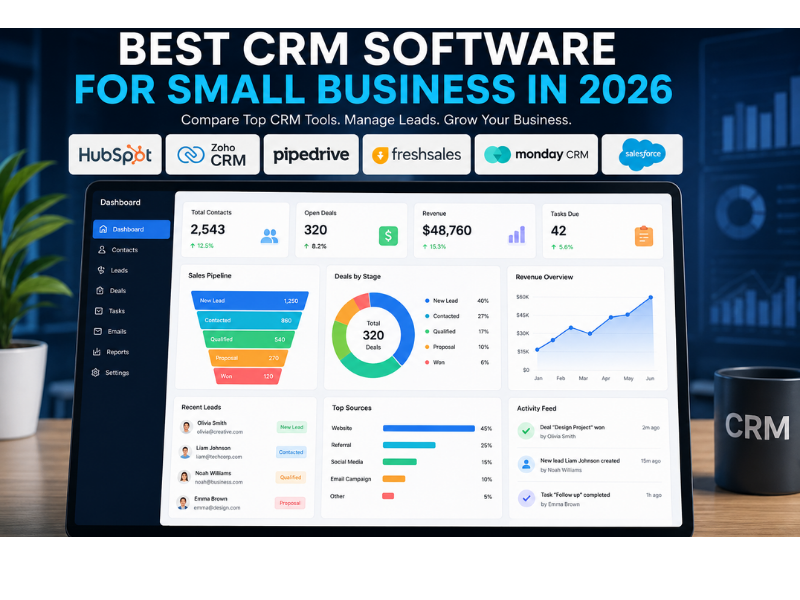
This guide compares the best CRM software for small businesses in 2026, helping you choose the right solution based on features, budget, and business needs.
Why Small Businesses Need CRM Software
Small businesses usually operate with limited teams and resources.
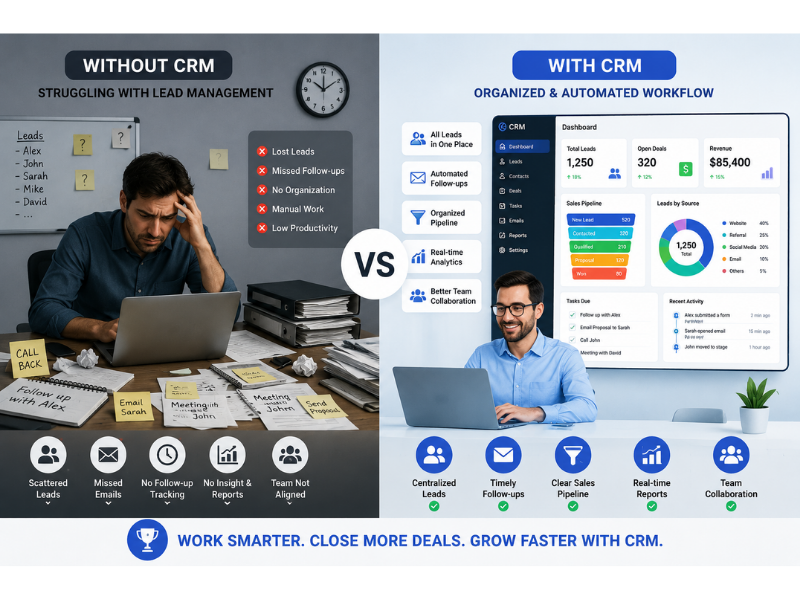
Without proper systems, common problems appear:
• Missed follow-ups
• Lost leads
• Slow response times
• Poor customer organization
• Manual repetitive work
• Inconsistent communication
CRM software solves these challenges by centralizing business processes.
Key benefits:
• Better lead management
• Faster follow-up workflows
• Improved sales tracking
• Better customer communication
• Automation support
• Performance reporting
Even a small business can grow significantly faster with the right CRM.
What to Look for in Small Business CRM Software
Before choosing CRM software, small businesses should evaluate practical features.
Important factors include:
Ease of Use
Complicated systems reduce adoption.
Small businesses need simple, intuitive interfaces.
Pricing
Budget matters.
Affordable monthly pricing is critical.
Automation Features
CRM should automate repetitive work like:
• Follow-up reminders
• Email triggers
• Lead assignment
• Status updates
Contact Management
Centralized customer records are essential.
Sales Pipeline
Businesses need visibility into deal progress.
Integrations
CRM should connect with:
• Email tools
• Website forms
• Marketing software
• Payment tools
• Communication platforms
Reporting
Performance insights help improve decisions.
Best CRM Software for Small Businesses in 2026
1. HubSpot CRM
Best Overall CRM for Small Business
HubSpot remains one of the most popular CRM platforms.
Best For
• Small businesses
• Startups
• Service providers
• Agencies
Pros
• Free plan available
• User-friendly interface
• Excellent lead management
• Email tracking
• Automation tools
• Marketing integrations
Cons
• Paid upgrades can become expensive
Pricing
Free plan available
Paid plans start higher depending on features
Verdict
Excellent all-round choice for beginners.
2. Zoho CRM
Best Budget-Friendly CRM
Zoho CRM offers powerful functionality at affordable pricing.
Best For
• Growing small businesses
• Budget-conscious companies
• Multi-channel businesses
Pros
• Affordable pricing
• Workflow automation
• Sales pipeline management
• Email integration
• Reporting tools
Cons
• Interface can feel complex initially
Pricing
Budget-friendly paid plans
Verdict
Great value CRM for growing teams.
3. Pipedrive
Best CRM for Sales Teams
Pipedrive focuses heavily on sales pipeline visibility.
Best For
• Sales-focused businesses
• Agencies
• Consultants
Pros
• Clean pipeline interface
• Strong deal tracking
• Sales activity management
• Easy usability
Cons
• Limited advanced marketing tools
Pricing
Mid-range pricing
Verdict
Strong CRM for sales-driven businesses.
4. Freshsales
Best Balanced CRM Solution
Freshsales offers a mix of simplicity and automation.
Best For
• Growing businesses
• Customer-focused companies
• Service teams
Pros
• Modern UI
• Built-in communication tools
• Automation support
• Lead scoring
• Reporting
Cons
• Advanced features require upgrades
Pricing
Competitive pricing
Verdict
Excellent balanced option.
5. Monday CRM
Best Visual CRM
Monday CRM is highly visual and beginner-friendly.
Best For
• Teams preferring visual workflows
• Project-oriented businesses
Pros
• Attractive UI
• Workflow customization
• Collaboration tools
• Task visibility
Cons
• Can become expensive
Verdict
Good for workflow-driven businesses.
6. Salesforce Essentials
Best for Advanced Growth
Salesforce remains an enterprise leader.
Best For
• Fast-growing businesses
• Businesses needing customization
Pros
• Powerful automation
• Deep integrations
• Advanced reporting
• Scalable infrastructure
Cons
• Learning curve
• Higher pricing
Verdict
Better for ambitious growth businesses.
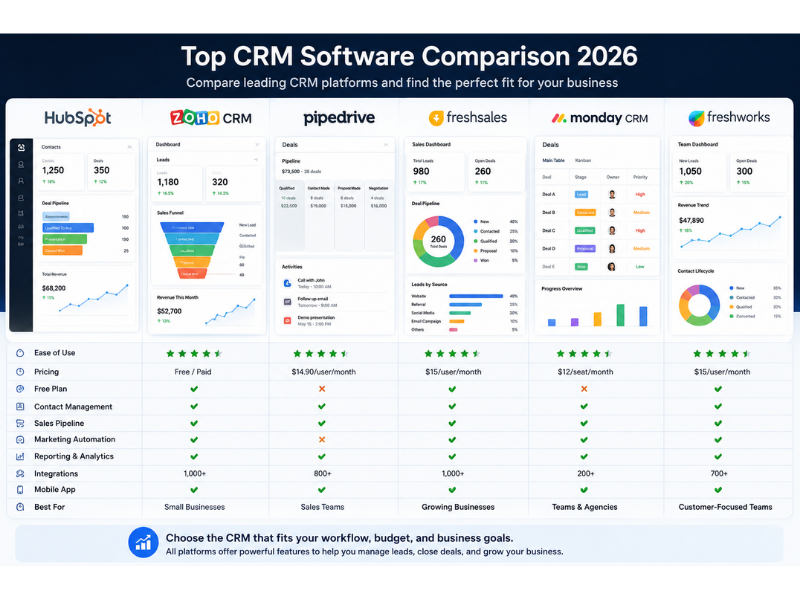
CRM Comparison Table
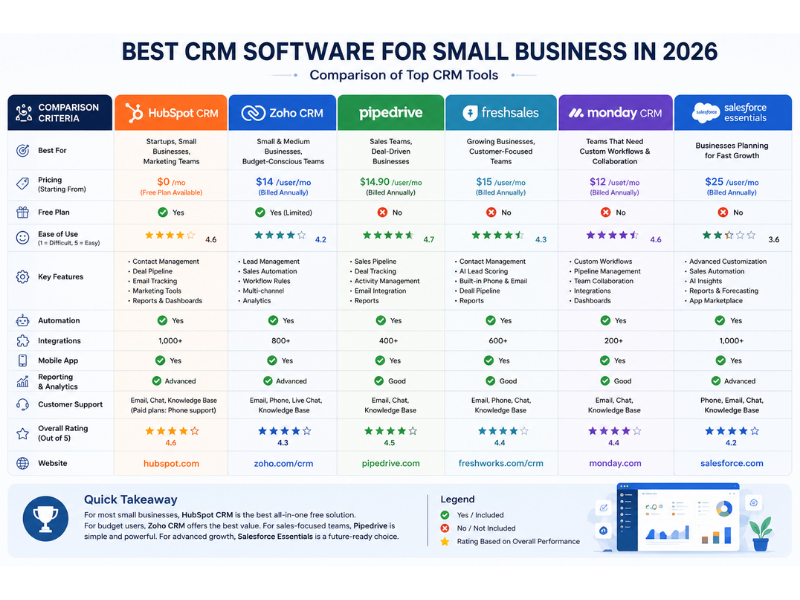
| CRM | Best For | Pricing | Ease of Use |
|---|---|---|---|
| HubSpot | Beginners | Free/Paid | Excellent |
| Zoho | Budget users | Affordable | Good |
| Pipedrive | Sales teams | Mid-range | Excellent |
| Freshsales | Balanced users | Competitive | Good |
| Monday CRM | Visual teams | Mid-high | Excellent |
| Salesforce | Advanced growth | Higher | Moderate |
Best CRM by Business Type
Different businesses have different needs.
For Startups
Best pick:
HubSpot CRM
Reason:
Free plan + easy onboarding
For Agencies
Best pick:
Pipedrive
Reason:
Sales-focused workflow
For Consultants
Best pick:
Freshsales
Reason:
Balanced customer management
For Budget Businesses
Best pick:
Zoho CRM
Reason:
Affordable features
For Scaling Businesses
Best pick:
Salesforce
Reason:
Scalability
Free CRM vs Paid CRM
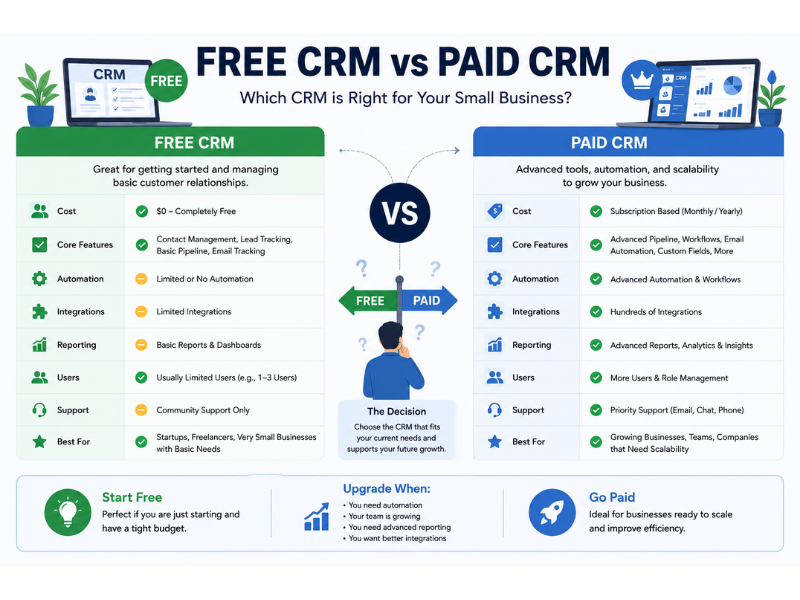
Free CRM works well for early-stage businesses.
Free CRM advantages:
• Low cost
• Easy entry
• Basic lead management
• Simple contact tracking
Paid CRM advantages:
• Automation
• Reporting
• Integrations
• Team collaboration
• Advanced workflows
For many businesses, starting free and upgrading later makes sense.
Common CRM Mistakes Small Businesses Make
Choosing Overly Complex Software
Too many advanced features create confusion.
Ignoring Automation
Manual work wastes CRM potential.
No Team Adoption
CRM only works when used consistently.
Poor Lead Organization
Messy data reduces effectiveness.
Selecting Based Only on Price
Cheap software may lack critical features.
How to Choose the Right CRM
Ask practical questions:
• How many leads do we manage monthly?
• Do we need automation?
• What is our budget?
• Do we need email integration?
• Will multiple team members use it?
• How technical is our team?
Match CRM to actual workflow needs.
CRM for Small Businesses Using WordPress
WordPress businesses can integrate CRM tools directly.
Common integrations:
• WPForms + CRM
• HubSpot plugin
• Zoho integration
• Zapier workflows
• Email automation tools
This improves lead capture and follow-up.
Future of Small Business CRM
CRM is becoming smarter.
Emerging trends:
• AI-powered automation
• Predictive lead scoring
• Smart customer insights
• Better integrations
• Automated communication
Small businesses adopting CRM early gain competitive advantages.
Final Recommendation
Best choices by category:
Best Overall:
HubSpot CRM
Best Budget:
Zoho CRM
Best Sales CRM:
Pipedrive
Best Balanced:
Freshsales
Best Visual:
Monday CRM
Best Advanced:
Salesforce Essentials
Verdict
The best CRM software for small businesses depends on your budget, workflow, and growth plans.
For most beginners, HubSpot CRM offers the easiest starting point.
Budget-conscious businesses will appreciate Zoho CRM.
Sales-driven teams may prefer Pipedrive.
The key is choosing CRM software that simplifies operations rather than complicating them.
The right CRM can improve lead management, customer communication, and sales growth significantly.
Need Help With CRM or Business Automation?
We help businesses improve workflow automation and digital operations.
Services include:
• CRM strategy consulting
• Workflow optimization
• Automation planning
• Business systems improvement
Contact us for support.

1 thought on “Best CRM Software for Small Business in 2026”