Introduction
Businesses today deal with customers across multiple channels including websites, phone calls, emails, social media, and messaging platforms. Managing all these interactions manually becomes difficult as the business grows.
Important customer information gets lost, follow-ups are missed, and sales opportunities disappear. This is where CRM software becomes essential.
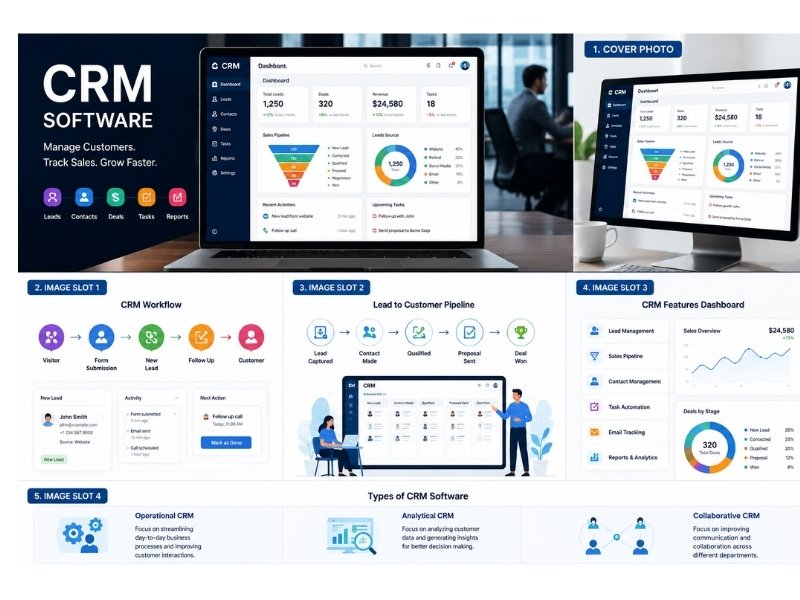
CRM software helps businesses organize customer information, track communication, automate tasks, and improve sales performance.
In 2026, businesses that use CRM software work faster, manage leads better, and build stronger customer relationships.
This guide explains what CRM software is, how it works, and why modern businesses need it.
What is CRM Software?
CRM stands for Customer Relationship Management.
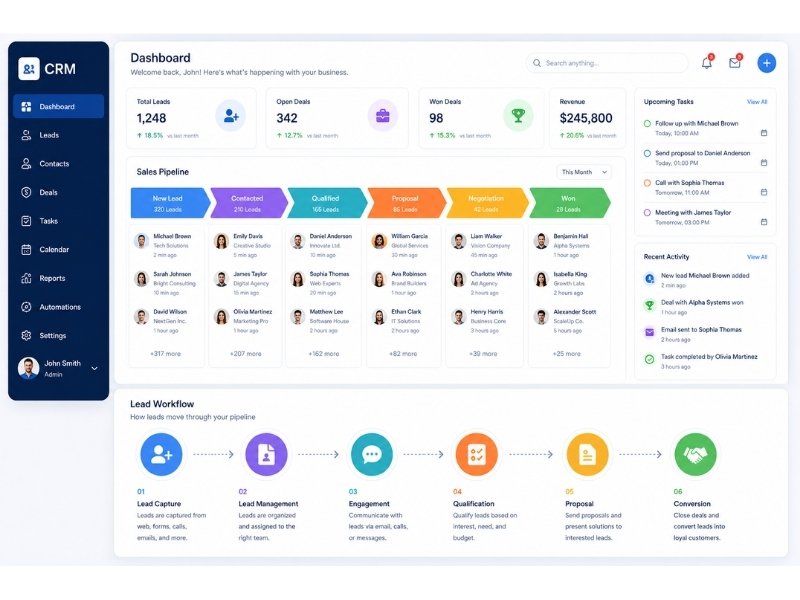
CRM software is a business tool that helps companies manage customer interactions, leads, sales pipelines, communication history, follow-ups, and customer data in one centralized system.
Instead of managing customer information manually through spreadsheets, notebooks, emails, or disconnected apps, businesses use CRM software to keep everything organized.
A CRM system acts like a digital command center for customer management.
CRM Stores Information Like:
• Customer names
• Phone numbers
• Email addresses
• Communication history
• Purchase details
• Follow-up tasks
• Sales status
• Notes and conversations
CRM helps businesses stay organized and efficient.
How CRM Software Works
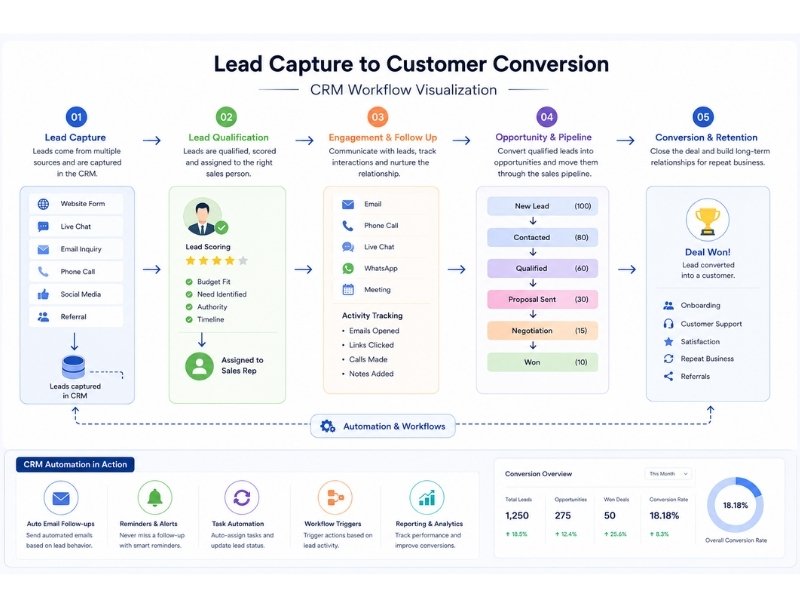
CRM software follows a structured workflow.
A potential customer enters your business ecosystem, and CRM tracks the journey.
Typical workflow:
Visitor visits website
↓
Fills contact form
↓
CRM captures lead
↓
Sales follow-up assigned
↓
Email reminders triggered
↓
Proposal sent
↓
Customer converted
This organized process helps businesses avoid missed opportunities.
CRM automates many steps that would otherwise require manual effort.
What is a Lead in CRM?
Many beginners get confused about the word “lead.”
A lead is a potential customer who has shown interest in your business but has not yet become a paying customer.
Examples of leads:
• Someone submits a contact form
• Someone requests a quote
• Someone asks for pricing
• Someone sends a WhatsApp inquiry
• Someone books a consultation
CRM software helps businesses manage these leads efficiently.
Without CRM, many businesses lose leads because follow-ups are forgotten.
Why Businesses Need CRM Software
Modern businesses handle customer communication from many sources.
Without a centralized system, information becomes scattered.
Common problems without CRM:
• Missed follow-ups
• Lost leads
• Confused communication
• Slow response times
• Poor customer experience
• Weak sales tracking
CRM solves these problems by centralizing operations.
Key Features of CRM Software
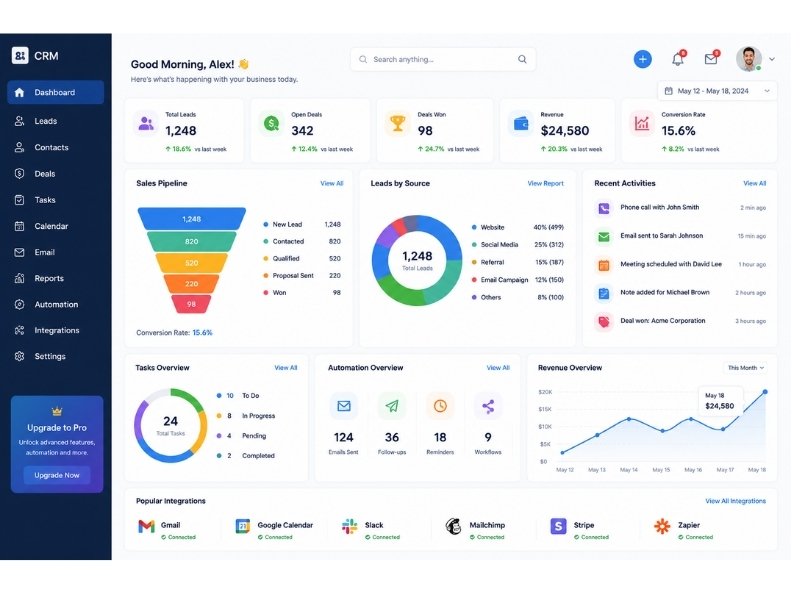
CRM platforms offer powerful business tools.
Lead Management
CRM helps track all incoming leads.
Businesses can see:
• New leads
• Contacted leads
• Qualified leads
• Lost leads
• Converted customers
This improves sales organization.
Sales Pipeline Management
CRM visually tracks customer progress through the sales process.
Example stages:
• New inquiry
• Contacted
• Follow-up
• Proposal sent
• Negotiation
• Closed
This helps teams understand deal progress clearly.
Contact Management
CRM stores complete customer details.
Instead of searching through emails or spreadsheets, all information remains accessible.
Task Automation
CRM automates repetitive business tasks.
Examples:
• Reminder notifications
• Follow-up scheduling
• Lead assignment
• Email automation
• Workflow triggers
Automation improves efficiency.
Communication Tracking
CRM stores communication history.
Businesses can track:
• Calls
• Emails
• Messages
• Notes
• Meeting history
This improves customer service consistency.
Reporting and Analytics
CRM provides performance insights.
Businesses can track:
• Number of leads
• Conversion rates
• Sales performance
• Team productivity
• Revenue trends
This improves decision-making.
Types of CRM Software
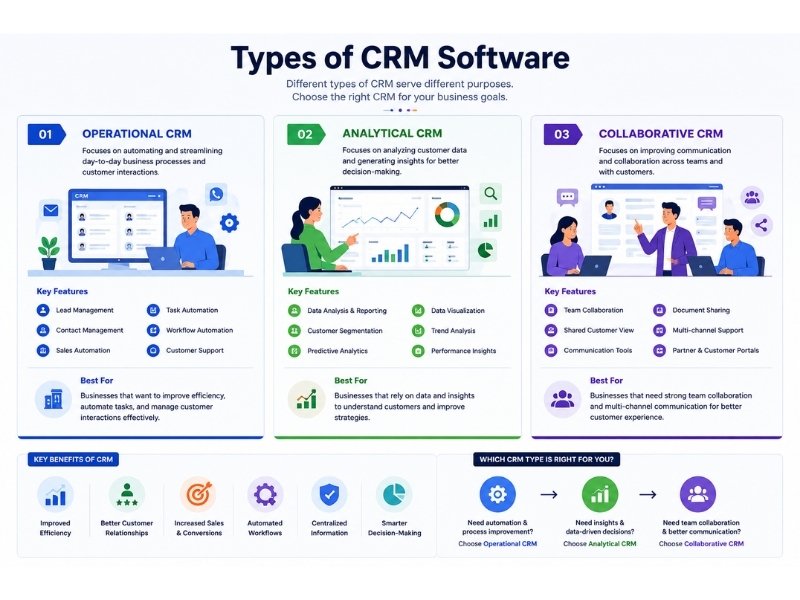
CRM systems come in different categories.
Operational CRM
Focused on day-to-day customer management.
Best for:
• Sales automation
• Lead tracking
• Task management
• Follow-up workflows
Analytical CRM
Focused on customer data analysis.
Best for:
• Reporting
• Customer behavior insights
• Sales forecasting
• Performance analysis
Collaborative CRM
Focused on team communication and customer collaboration.
Best for:
• Shared customer records
• Team coordination
• Multi-channel communication
Different businesses may need different CRM types.
Benefits of CRM Software
CRM offers major advantages.
Better Lead Management
No lead gets forgotten.
Businesses track every inquiry systematically.
Faster Sales Process
Organized follow-ups improve conversion speed.
Better Customer Relationships
CRM helps businesses deliver personalized service.
Improved Productivity
Automation reduces repetitive manual tasks.
Better Team Collaboration
Sales, support, and marketing teams stay aligned.
Centralized Business Data
Customer information stays organized in one place.
Better Decision-Making
Analytics improve business planning.
Which Businesses Need CRM Software?
CRM is useful for many industries.
Examples:
• IT companies
• SaaS businesses
• Digital agencies
• Real estate businesses
• Healthcare providers
• Educational institutions
• E-commerce stores
• Insurance companies
• Consultants
• Sales teams
Any business that manages customer relationships can benefit.
CRM for Small Businesses
Many people think CRM is only for large companies.
This is incorrect.
Small businesses benefit significantly because they often struggle with organization and follow-ups.
CRM helps small businesses:
• Stay organized
• Save time
• Improve response speed
• Track inquiries
• Increase conversions
Modern CRM solutions are affordable and beginner-friendly.
Popular CRM Software Examples
Some of the most popular CRM platforms include:
HubSpot CRM
Best for beginners and small businesses.
Features:
• Free plan
• Lead management
• Email tracking
• Automation tools
Zoho CRM
Budget-friendly business CRM.
Features:
• Sales automation
• Workflow tools
• Reporting
• Multi-channel communication
Salesforce
Enterprise-level CRM.
Features:
• Advanced automation
• Deep customization
• AI integration
• Complex workflows
Pipedrive
Sales-focused CRM.
Best for pipeline management.
Freshsales
Balanced CRM solution for growing businesses.
CRM vs Spreadsheet Management
Some businesses still manage leads manually.
This creates limitations.
Spreadsheet problems:
• Manual updates
• Human error
• Missed follow-ups
• Poor collaboration
• No automation
CRM advantages:
• Automation
• Better organization
• Centralized records
• Analytics
• Faster workflows
CRM is a smarter long-term solution.
Common CRM Mistakes Businesses Make
Choosing Overly Complex CRM
Beginners often select systems too advanced for their needs.
Not Training Team Members
Poor adoption reduces CRM effectiveness.
Ignoring Automation Features
Manual use wastes CRM potential.
Poor Data Entry Practices
Incomplete customer data creates confusion.
No Clear Sales Process
CRM works best with defined workflows.
How to Choose the Right CRM Software
Consider these factors:
• Business size
• Budget
• Required features
• Ease of use
• Integration options
• Automation capability
• Reporting tools
• Customer support
The best CRM depends on your workflow.
Future of CRM Software
CRM is evolving rapidly.
Emerging trends include:
• AI-powered CRM automation
• Predictive analytics
• Smart lead scoring
• Automated customer engagement
• Deeper workflow integrations
CRM platforms will become smarter and more automated.
Verdict
CRM software is no longer optional for businesses that want organized growth.
It helps manage leads, improve customer relationships, automate repetitive tasks, and increase sales efficiency.
Whether you run a small business or a growing company, CRM can improve productivity and reduce missed opportunities.
The right CRM system helps businesses work smarter, not harder.
Need Help Implementing CRM Solutions?
We help businesses improve digital workflows and automation systems.
Services include:
• Business workflow consulting
• Automation strategy
• CRM integration planning
• Process optimization
Contact us for professional guidance.

1 thought on “What is CRM Software and Why Does Your Business Need It in 2026?”