Evernote Review 2026: Is It Still Worth Using?
For over a decade, Evernote has been a popular choice for note-taking and organizing ideas. Many users remember its early days as a simple, trusted tool for storing everything from work notes to recipes. But in 2026, with new competitors and changing user needs, is Evernote still a smart choice? This review gives you a clear look at what Evernote offers today, its strengths and weaknesses, and whether it fits modern workflows.
What Evernote Offers In 2026
Evernote’s main goal is simple: help people capture, organize, and find information quickly. The latest version keeps its core strengths but adds new features to stay relevant.
- Notes and Notebooks: Create text notes, to-do lists, and attach files. Organize everything in notebooks with tags for fast searching.
- Sync Across Devices: Access notes on Windows, Mac, iOS, Android, and the web. Sync is usually fast and reliable.
- Web Clipper: Save web pages, articles, and screenshots straight into Evernote with a browser extension.
- AI-Powered Search: Find notes, even handwritten ones, with Evernote’s improved AI search.
- Templates and Tasks: Use built-in templates for meeting notes, project plans, and manage tasks within notes.
- Collaboration: Share notes or notebooks with others, set permissions, and work together in real time.
The interface is clean, with a focus on speed. Dark mode, improved font choices, and customizable layouts help users personalize their workspace.
Pricing And Plans
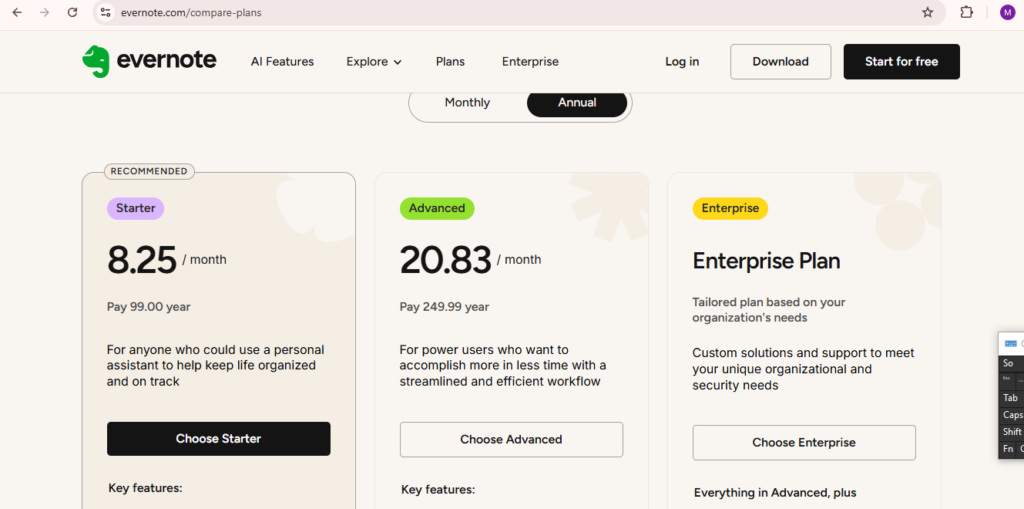
Evernote has shifted its pricing model over time. In 2026, it offers three main plans. Here’s a simple breakdown:
| Plan | Monthly Cost | Main Features |
|---|---|---|
| Free | $0 | Basic notes, sync on 2 devices, 60MB upload/month |
| Personal | $9.99 | Unlimited devices, 10GB upload, tasks & templates |
| Professional | $14.99 | Team features, admin controls, advanced AI search |
The free plan is enough for light users, but the upload limit feels small if you add images or large files. Most users who want the full experience pick the Personal plan.
How Evernote Compares To Competitors
In 2026, the note-taking market is crowded. Apps like Notion, Microsoft OneNote, and Apple Notes are strong options. How does Evernote stand out?
| Feature | Evernote | Notion | OneNote |
|---|---|---|---|
| Offline Access | Yes | Yes (with paid plan) | Yes |
| Handwriting Search | Yes | No | Yes |
| Web Clipper | Excellent | Good | Basic |
| Task Management | Basic | Advanced | Basic |
| Price (Personal) | $9.99 | $8.00 | Free |
Notion is popular for its flexibility and database features, while OneNote is free and integrates well with Microsoft Office. Evernote’s search power and web clipper still lead, but it lags in advanced project management.
What’s New And Improved In 2026
Evernote has made some important updates in the last year:
- AI Summaries: Evernote can now create short summaries of long notes or meeting transcripts.
- Audio Note Transcription: Record voice notes and get automatic transcripts in seconds.
- Smart Reminders: Set reminders based on location or time, with better notification options.
- Calendar Integration: Link notes with Google or Outlook calendars for meeting prep.
These upgrades save time and help users who handle lots of data every day. For example, students can quickly turn lecture recordings into text, and busy professionals can prepare for meetings with one click.
Credit: techhogol.com
Where Evernote Still Falls Short
No app is perfect. Evernote’s biggest problems in 2026 are:
- Price: Competitors offer more for less. Some users feel the Personal plan is too expensive for basic needs.
- Offline Editing on Free Plan: Only available on paid plans, which frustrates some mobile users.
- Task Management: While improved, task tools are still simple compared to dedicated apps or Notion.
- Data Privacy Concerns: Evernote’s servers are in the US, and some users worry about privacy compared to local-only apps.
One insight many miss: if you rely heavily on tables, advanced linking, or team wikis, Notion may fit you better. But if you want fast search and capturing info from the web, Evernote still wins.
Who Should Use Evernote In 2026?
Evernote is a strong choice for:
- People with large collections of notes and documents.
- Users who need to find old information quickly.
- Those who use both text and voice notes.
- People who work across different devices and operating systems.
However, if you’re a power user needing complex databases or deep task management, you may outgrow Evernote’s limits.
Real-world Example
Consider a freelance writer managing articles, interviews, and research. Evernote’s web clipper grabs sources, AI search finds old quotes in seconds, and audio transcription turns interviews into editable text. This saves hours every week.
But a project manager running big teams may prefer Notion for its databases and project boards. The right choice depends on your workflow.
Two Insights Beginners Miss
- Migration Isn’t Simple: Moving hundreds of notes from Evernote to another app can be hard. Tags, images, and formatting may not transfer perfectly.
- Web Clipper Power: Evernote’s web clipper can capture full pages, simplified articles, or screenshots. You can even highlight text as you clip, a feature missing in many competitors.
Credit: thebusinessdive.com
Should You Still Use Evernote?
If your main goal is to capture, organize, and search notes with minimum setup, Evernote remains a top choice in 2026. Its search, web clipper, and new AI features keep it ahead for quick knowledge management. But for those wanting deep project management, or on a tight budget, other tools might be better.
For further comparison and user reviews, visit the official Evernote website.
Frequently Asked Questions
Is Evernote Free To Use?
Yes, Evernote offers a free plan with basic note features and sync on up to two devices. For more storage and advanced features, you need a paid plan.
Can I Use Evernote Offline?
Offline access is available, but only on paid plans. Free users need an internet connection to view and edit notes.
How Secure Is My Data In Evernote?
Evernote uses encryption in transit, but notes are not end-to-end encrypted by default. Sensitive data should not be stored without extra protection.
Does Evernote Work Well With Other Apps?
Evernote integrates with tools like Google Drive, Slack, and Outlook. Its calendar and email features are easy to set up and use.
Is Evernote Good For Teams?
Evernote’s Professional plan supports team sharing and admin controls, but it’s less powerful for team project tracking than some competitors like Notion.
Evernote in 2026 is still a smart, reliable option for many, but the best choice depends on your needs and workflow.

Credit: firebearstudio.com
