Notion Review 2026: Features, Pricing, And Benefits
Every year, more people look for smart ways to manage work, ideas, and daily life. Notion stands out as a tool that promises to do it all—notes, tasks, databases, and team projects in one place. But is it really as powerful and simple as people say?
In 2026, Notion offers new features and changes that are worth a closer look. This review breaks down what you get, how much you pay, and whether Notion is the right choice for you.
Core Features Of Notion In 2026
Notion has grown from a simple note app to a flexible workspace. Here are the main features users can expect now:
All-in-one Workspace
You can create notes, to-do lists, databases, wikis, and even project boards. Everything lives in one space, so you don’t jump between apps.
Real-time Collaboration
Teams can edit pages at the same time. Comments and mentions make working together faster, especially for remote work.
Ai-powered Tools
Notion’s AI helps you:
- Summarize long notes
- Suggest action items from meeting notes
- Auto-tag and organize content
For example, the AI can turn a page of messy meeting notes into a clean summary with key decisions highlighted.
Customizable Templates
Notion has a large library of templates for:
- Project management
- Personal journals
- Budget trackers
- Lesson plans
These templates save you time and help beginners get started.
Database Functions
Notion lets you build databases with tables, boards, calendars, or galleries. You can filter, sort, and link items together. For example, you can track job applications, connect them to contacts, and set reminders.
Advanced Permissions
You control who can view, edit, or comment on any page. This is crucial for managing sensitive work or sharing with clients.
Mobile And Offline Access
Notion offers fully-featured apps for iOS, Android, Windows, and Mac. Offline mode lets you keep working even without internet—a big improvement over earlier versions.
Pricing: What Does Notion Cost In 2026?
Notion uses a tiered pricing model. Here’s a simple breakdown:
| Plan | Price (per month) | Main Features |
|---|---|---|
| Free | $0 | Personal use, limited file uploads, basic AI |
| Plus | $10 | Unlimited blocks, advanced AI, version history |
| Business | $18 | Team tools, admin controls, SSO, priority support |
| Enterprise | Custom | Advanced security, audit logs, custom contracts |
Students and educators often get discounts or free upgrades. Annual billing saves you 15-20% compared to monthly payments.
Credit: www.getapp.com
Notion Vs. Competitors
How does Notion stand against other popular productivity tools? Here’s a quick comparison:
| Feature | Notion | Evernote | ClickUp |
|---|---|---|---|
| Notes & Docs | ✔️ | ✔️ | ✔️ |
| Databases | ✔️ | ❌ | ✔️ |
| Kanban Boards | ✔️ | ❌ | ✔️ |
| AI Tools | ✔️ | Limited | ✔️ |
| Offline Access | ✔️ | ✔️ | ✔️ |
Unique Insight: Many users don’t realize that Notion’s database features can replace simple spreadsheets and even basic CRM systems, reducing the need for extra tools.
Major Benefits Of Using Notion
Flexible Organization
You can build systems that match your style—minimal notes, complex project tracking, or anything between. Unlike fixed apps, Notion adapts to you.
One-stop Solution
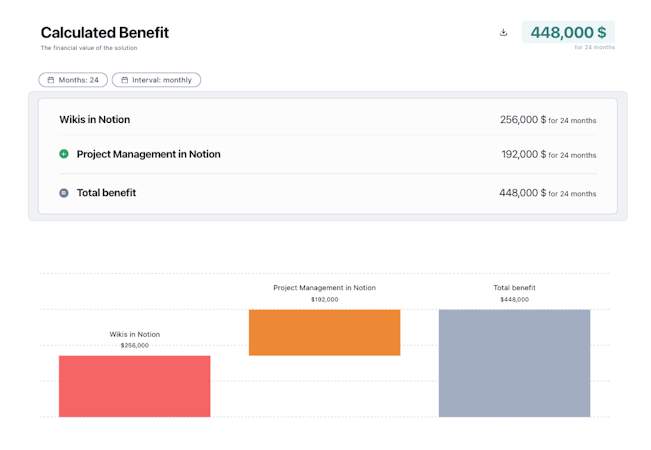
No need for separate apps for notes, tasks, wikis, and calendars. Notion covers all these needs, which saves money and reduces confusion.
Active Community And Integrations
There’s a strong user community sharing templates, tips, and integrations. Notion connects with tools like Google Calendar, Slack, and Zapier, making it more powerful.
Fast Search And Linking
The search feature is quick, even in large workspaces. You can link related pages easily, so knowledge stays connected.
Non-Obvious Tip: Linking pages lets you build a personal knowledge network, making it easier to find connections between projects, ideas, and resources—something most beginners miss.
Credit: www.truefoundry.com
Drawbacks And Limitations
No tool is perfect. Some drawbacks to keep in mind:
- Learning curve: Notion’s flexibility can overwhelm new users. It takes time to learn best practices.
- Export options: Exporting data is possible, but complex databases may not move smoothly to other apps.
- Speed: On very large workspaces, Notion can feel slower compared to simpler apps.
Who Should Use Notion?
Notion fits best for people who need:
- A mix of notes, tasks, and databases
- Flexible workflows
- Team collaboration
It’s great for students, freelancers, startups, and medium-sized teams. However, those who only need simple note-taking or task lists may find it more complex than necessary.

Credit: www.totalmotorcycle.com
Real-world Example
A small marketing agency uses Notion to manage clients, track campaigns, and plan content. They use templates for onboarding, databases for client details, and boards for tracking tasks. The result: less time wasted switching tools and more focus on client work.
Notion: 2026 Updates Worth Noting
- Better AI: More natural writing help and smart organization.
- Improved offline mode: Fewer sync issues when working on the go.
- Stronger security: Two-factor authentication and more admin controls.
- Simpler onboarding: Guided setup for new users.
These updates keep Notion ahead in the fast-changing productivity world.
Frequently Asked Questions
Is Notion Secure For Sensitive Information?
Notion uses encryption for data at rest and in transit. Enterprise plans offer advanced security like audit logs. For most users, it’s safe, but avoid storing highly sensitive data like passwords.
Can Notion Handle Large Teams?
Yes, the Business and Enterprise plans support big teams, with admin controls and permission settings. However, training is important to help teams use it well.
Does Notion Work Offline?
Notion’s mobile and desktop apps allow offline editing. Changes sync when you reconnect to the internet. For best results, open important pages before going offline.
How Does Notion’s Ai Compare To Other Tools?
Notion’s AI is strong at summarizing, organizing, and suggesting actions. It’s more focused on writing and productivity than creative tasks. For more details, visit the official Notion AI page.
Is Notion Free For Students?
Many students get Notion Plus for free with a valid school email. Check Notion’s website for the latest offers.
Notion in 2026 remains a top choice for those who want a flexible, all-in-one workspace. With new AI tools, better offline access, and strong community support, it’s more than just a note app—it’s a true productivity platform. If you’re ready to organize your work and ideas in one place, Notion is worth a serious look.
